



Compare and edit your MetaTrader .set files side by side.
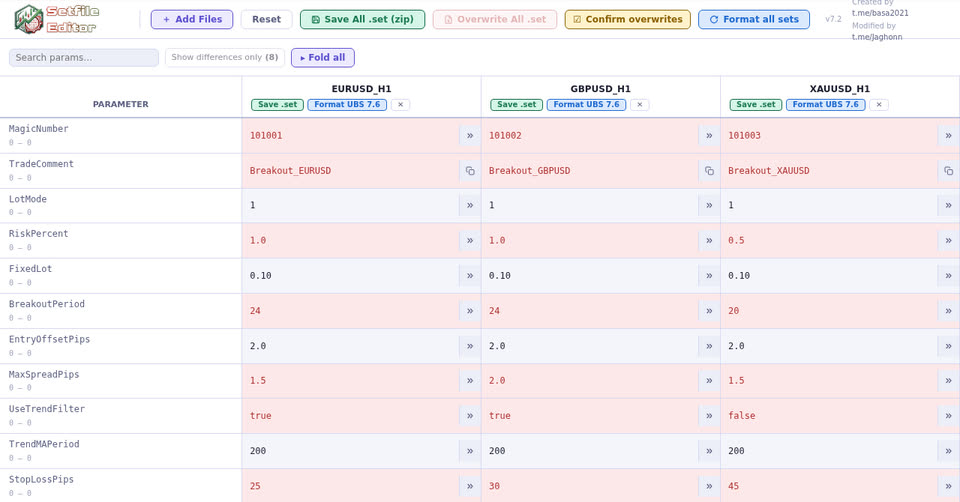
- Open several .set files and spot their differences at a glance.
- Edit a value, or apply it to every file in one click.
- Save one file, all of them as a zip, or overwrite the originals directly.
- Everything happens in your browser: your files are not sent anywhere.
This tool needs a large screen and a mouse to be comfortable. Open it on your computer.
What's new in the Setfile Editor
v7.6 November 1, 2026
- UBS 9.5 format: the button becomes "Format UBS 9.5", online and in the downloadable version. UBS 9.x adds two settings, added with their default values by the format: RNG_OnlyRangeBasedSLTP ("Only use Range Based SL/TP" of the Range Breakout, off) and ResetHighestBalanceOnWithdrawal (lot-size settings, on). Checked against a default set saved from UBS 9.5.
- UBS manual FX Live version: clicking a parameter name now opens the 9.0 manual, including "Only use Range Based SL/TP".
v7.5 October 15, 2026
- UBS 8.4 format: the button becomes "Format UBS 8.4", online and in the downloadable version. UBS 8.4 adds PortfolioName (portfolio name shown in the info panel), added empty by the format; UBS 8.3 saves its .set files like 8.2. Checked against default sets saved from UBS 8.3 and 8.4.
- Your broker's symbols FX Live version: the "Broker symbols" button (or ⇄ next to ForceSymbol) replaces the ForceSymbol of your sets with your broker's names: XAUUSD becomes XAUUSD.p at PU Prime, XAUUSD+ at Vantage, XAUUSD-ECN at VT Markets… Pick your broker and, if needed, its server: the window shows every change before applying it. The names come from the FX Live symbol directory, fed by the accounts connected to the site.
- Your files are kept FX Live version: the loaded .set files stay in your browser and come back when you reload the page, with your edits in progress. Nothing is sent to the site; "Reset" clears them.
- Cleaner rows: the copy buttons (») now span the full height of the row, even when the parameter name takes two lines.
v7.4 October 12, 2026
- UBS 8.2 format: "Format UBS 8.2" on each file, or "Format all sets" for all of them, brings your .set files to the latest UBS layout. The parameters added since UBS 7.6 come in with their default values: group closing (GroupClose_*, UBS 7.7) and reverse trades (ReverseTrades, UBS 8.2). DumpSetConfig_, removed by UBS, is dropped, and section headers follow their new spelling. Your values are kept.
- The UBS manual built in FX Live version: click the name of a UBS parameter to open, over the editor, the section of the manual that explains it, with its row highlighted. The full manual, with its table of contents and search, also opens from the "UBS Manual" button in the toolbar, left of "Add Files".
- More reliable: checked in UBS 8.2 itself, every value of a reformatted set is read back identically. Two fixes along the way: an old set loaded next to a recent one now gets the default values of the new parameters, and the cell of a parameter missing from a file can no longer be edited (a value typed there was not saved): "Format UBS 8.2" adds it. Formatting now only applies to UBS set files: the set of another EA loaded alongside is left untouched by "Format all sets" (its own parameters were dropped before).
- Group closing unit: GroupClose_Unit becomes a drop-down, "Currency ($ / EUR ...)" or "% of balance used", like UBS's other choices.
v7.3 September 30, 2026
- Duplicate magic numbers: when several loaded files share the same magic number, an alert appears to the right of "Fold all" and the cells involved are outlined in orange with an "N×" badge. Clicking the alert takes you to each of them. The parameter is recognised whatever its name (EA_MagicNumber, MagicNumber, InpMagic…), and 0 is ignored.
- Your magic numbers already known FX Live version: when you are signed in, the editor checks the magic numbers of the loaded files against your database. A green button to the right of "Fold all" shows how many are already there, and their cells turn green with a "?" badge. On hover: the name given in Magic Database, the EAs that use it and the accounts where it has traded (open positions, closed trades, date of the last one).
v7.2 September 23, 2026
- Fix for the RNG_TimeZone drop-down: the 3 options were saving a "0", "1" or "2" value in the .set, while UBS expects "1", "2" or "3". This could lead UBS to use the wrong timezone if this parameter was saved through the Setfile Editor.
v7.1 September 19, 2026
- "Apply to all": a button to the right of each cell copies its value to every other loaded file. It replaces the Batch Edit section: search for the parameter, edit the first cell, apply the value to the others.
- Fix for the Risk and BacktestSpeed drop-downs: the editor was saving values UBS does not recognise (0 to 4 instead of its own codes for Risk, 0 to 3 instead of 1 to 4 for BacktestSpeed). The parameter came back empty once the .set was reloaded in MT5.
- Section titles stay visible on the left when you scroll the table horizontally.
v7.0 September 18, 2026
- Drop-down menus in batch editing for parameters with limited options (Risk, strategy, timeframes…), as in the cells.
v6.3 September 18, 2026
- One-click reformat to the UBS 7.6 format: "Format UBS 7.6" on each file, or "Format all sets" for all of them. Parameter order, sections and new parameters of the latest UBS version, as if the file had been reloaded and re-saved in UBS 7.6. Your values are kept.
- UBS 7.6 sections: the ";####" headers become foldable sections, and the separators between two blocks show as a banner.
- Drop-down menus for parameters with limited options (Risk, strategy, timeframes…): the readable label is shown ("1 Day" rather than 16408), the value expected by the EA is saved.
- Toggle switches on every true/false option, including in files re-saved by UBS in the compact format.
- Rename the file after its comment with one click on the button of the Comment field. The .set extension is hidden and added automatically.
v6.2 September 7, 2026
- Overwrite the original files FX Live version directly on disk, without going through your downloads folder: "Overwrite All .set" or "Overwrite" on each file (Chrome, Edge, Opera). A confirmation lists the files involved, and can be turned off with "Confirm overwrites".
- "Save All .set" becomes "Save All .set (zip)", to tell them apart.
- Better contrast for the "Show differences only" button in dark mode.
v6.1 September 7, 2026
- Drag and drop fixed: you can drop more .set files again after a first import.
- Many files side by side: the table scrolls horizontally instead of overflowing the page, and the search sits on one line with the other tools.
- Standalone version: the editor also comes as a plain .html file, to open offline and share.
v6.0 July 16, 2026
- Foldable sections: clicking a section title folds or unfolds it, and "Fold all / Unfold all" acts on all of them. The search also finds parameters in folded sections.
- Your edits are no longer lost when you add or remove a file.
Created by t.me/basa2021 - Improved by t.me/Jaghonn
Drop .set files here
or click to choose files — open multiple files to compare & edit side by side
PARAMETER |
|---|
No differences found — all values are identical across files